

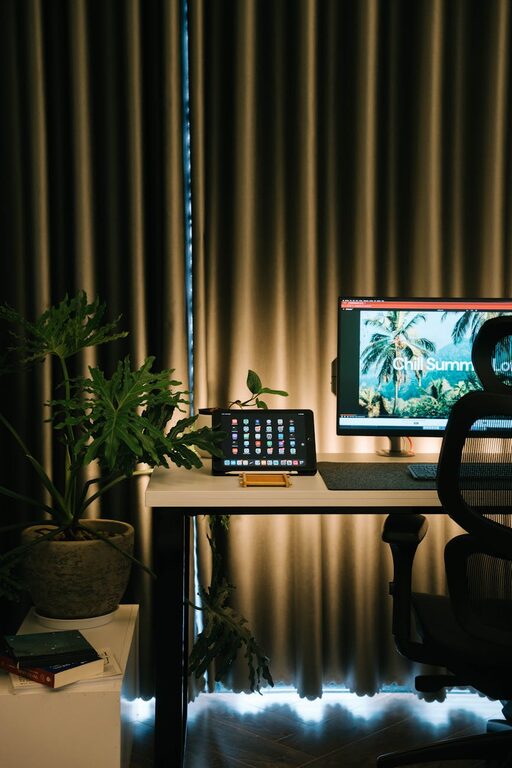
Creating a home workspace that is both inviting and functional plays an important role in supporting productivity and maintaining a healthy work-life balance. Whether you are working remotely full-time or occasionally need a quiet corner for tasks, designing the right environment can make all the difference. In this guide, we explore practical and easy-to-apply tips to help you set up a workspace that feels comfortable, organized, and efficient.
Choose the Right Location
Assess Your Space Options
Start by evaluating different areas in your home where a workspace could fit. This might be a spare room, a section of the living room, a nook near a window, or even a part of your bedroom. Consider natural light, noise levels, and privacy needs. A quiet spot with good daylight helps reduce eye strain and boosts mood and focus.
Keep It Separate if Possible
If space allows, pick a location that is separate from your living and sleeping areas. Physically separating work from leisure space helps create mental boundaries, making it easier to “switch on” work mode and “switch off” after hours.
Invest in Comfortable, Ergonomic Furniture
Choose an Appropriate Desk
Select a desk size that fits your available space and work style. It should be large enough to hold your computer, notes, and any other tools without clutter. If space is limited, consider wall-mounted or foldable desks.
Find a Supportive Chair
A good chair is crucial to avoid back pain and maintain good posture. Look for ergonomic chairs that support the natural curve of your spine and allow adjustable height and armrests. If possible, try before you buy.
Consider Adjustable Solutions
Standing desks or desk converters allow you to change positions throughout the day, promoting circulation and reducing fatigue. Even a small standing break can refresh your focus.
Optimize Lighting
Maximize Natural Light
Position your desk near a window to take advantage of daylight. Indirect natural light minimizes glare and helps maintain a pleasant atmosphere. Use light curtains to diffuse harsh sunlight.
Add Task Lighting
An adjustable desk lamp provides focused light where you need it most, reducing eye strain. Choose bulbs that offer soft white light for comfort and productivity.
Balance Ambient Light
Ensure your workspace has enough overall light. Avoid harsh overhead lights that cause shadows or glare on screens.
Organize with Purpose
Reduce Clutter
Keep only essential items on your desk to maintain a clean, distraction-free environment. Use drawers or storage bins to keep papers, supplies, and gadgets out of sight but within reach.
Use Organizational Tools
Desk organizers, file holders, and cable management solutions help keep your workspace neat and efficient. Label storage boxes and trays for easy access to what you need.
Plan Your Layout
Arrange your monitor, keyboard, mouse, and other frequently used items within comfortable reach. Place less-used items further away or in drawers.
Personalize Your Space
Add Inspiring Elements
Include a few personal touches like plants, artwork, or photos to make the space welcoming. Plants can improve air quality and bring a sense of calm.
Choose Calming Colors
Soft, neutral colors create a soothing environment ideal for focus. Avoid overly bright or distracting patterns.
Incorporate Textures and Comfort
Add a cozy rug, cushions, or an ergonomic footrest for added comfort during long work sessions.
Minimize Distractions
Control Noise
Use noise-cancelling headphones or white noise machines if background sounds are disruptive. Soft background music or nature sounds can also enhance concentration.
Set Boundaries
Communicate your work hours and workspace rules with household members to minimize interruptions.
Technology and Connectivity
Ensure Reliable Internet
A strong and stable internet connection is essential. Position your workspace near your router or use a wired connection.
Organize Cables
Use cable clips and holders to keep wires tidy and off the floor. This not only looks neater but reduces tripping hazards.
Use Quality Equipment
Invest in a good monitor, keyboard, and mouse that suit your needs to improve comfort and efficiency.
Take Breaks and Move
Schedule Regular Breaks
Step away from your desk every hour to stretch, hydrate, or take a short walk. This helps prevent burnout and keeps energy levels up.
Create a Movement-Friendly Environment
Keep a yoga mat or small weights nearby for quick stretches or exercises during breaks.
Maintain Your Workspace
Daily Tidying
Spend a few minutes each day to put things back in place. A tidy workspace contributes to a clear mind.
Periodic Reassessment
Every few months, review your setup to see if it continues to meet your needs and make adjustments as required.
—
By thoughtfully choosing location, furniture, lighting, and organization, you can create a home workspace that is inviting and functional. With some personalization and good practices, your workspace can become a place where productivity flows naturally and work feels less like a chore. Use these tips as a starting point to design a space tailored to your needs and style.